
Heard you’ve looked at reviews of the best home security camera brands and the majority of the reviews are ad-supported, mostly clickbait? This is what actually determines which camera is denoted as the “winner”.
Note to my audience – There are no affiliate links, no commission, and no partnership with any of the 5 brands below.
This comparison is possible because there is no single correct or best answer to the question of which brand of home security camera is best. It depends on your budget, or if you want a wired or wireless camera, and if you don’t mind paying a subscription for the rest of your life to retain your footage. So, rather than designating a winner, we went over the criteria you’re optimizing for.
The prices and specifications listed below were obtained from the most recent 2026 offerings and are accurate at the time of publication.
But don’t be shocked by crazy price changes or spec changes by brands, as these can happen at any moment.
If you’re in a hurry
- Tightest budget: Eufy or Ring’s entry Indoor Cam
- Pro-grade, scalable system: UniFi Protect
- Wire-free flexibility: Arlo or Eufy
- Local storage, no subscription: UniFi or Eufy
- Deepest smart home integration: Nest (Google Home) or Ring (Alexa)
Now if you are here for the real deal, we got exactly what you’re looking for.
We got a solution if you’re trying to save money
If your decision is primarily based on price, we recommend Eufy and Ring to choose.
The starting price for Eufy is in the $40 to $50 range, so it’s unusual for a camera at this price to include local storage for free. Ring’s Indoor Cam begins in a similar fashion, and its Outdoor Cam is also one of the lowest-priced options for outdoor coverage (under $100).
But the problem with Ring is that almost all the useful features, recorded cloud playback, person detection, etc., are behind a Ring Protect subscription. The camera is cheap; the day-to-day costs of actually using it as a security camera are what you really need to plan for.
Eufy’s local-storage-first approach guarantees the budget tier remains budget-friendly, even after all this time. They both begin with a decent jump, with Arlo’s lowest price at $40 to $100, and Nest’s lowest-priced wired, indoor camera at around $100.
Or if you want pro-grade and scalable systems
This is UniFi Protect’s category, and it’s not even close. We’ll tell you why.
The price for UniFi cameras ranges from approximately $180 for the entry-level Wi-Fi cameras all the way up to $400-$500 for Pro Tier cameras that include bullet and PTZ models with upgraded sensors, optical zoom, and extended night vision.
Not only that, the lineup goes through a local NVR that you own, and guess what? You will have no per-camera or per-month charges! 4 cameras or 400 on the same free software.
So … what’s the compromise?
UniFi will require a certain level of technical comfort that isn’t always found in a plug-and-play camera. Most models require PoE wiring, not battery power, and you are usually purchasing a recorder as part of a system.
So if you’re willing to do a little configuration and don’t want anything “kiddie,” and you need a serious, professional-grade setup, it’s difficult to argue with the long-term cost-per-camera.
If you’re looking for wire-free flexibility
Arlo and Eufy are designed with this specific scenario in mind: When cameras can go anywhere- no outlet, no hole you need to drill! That is what they are built for.
Arlo essentially pioneered the mainstream battery-powered outdoor camera, with battery models ranging from an affordable Essential tier at 2K ($40–$100) all the way up to the 4K Ultra 2 flagship ($200–$350) for larger properties. Its SoloCam and eufyCam lines are similar but frequently less expensive, and again come with local storage instead of having to pay for it to access videos.
Ring’s battery-powered Spotlight and Floodlight cameras are also wireless (but not as good in terms of placement flexibility, as built-in lighting and sirens).
When it’s truly about video without any wires, it’s typically a choice between Arlo (more upscale video, subscription often a requirement) vs. Eufy (a more budget-friendly option with local storage that’s usually built in, with a less sophisticated app, according to most reports).
If you prefer local storage and no subscription
This is where the 5 brands differ the most.
There’s no local storage at all for Nest. The lack of microSD card support and the absence of local NVR on all Nest cameras means that all Nest cameras depend on a Google Home Premium subscription (formerly Nest Aware) for more than 3 hours of events. If you don’t have a subscription, a Nest camera will notify you as soon as an action occurs, but it won’t record anything for later viewing.
In the middle is Arlo, which requires a subscription to Arlo Secure, and has some cameras with an optional local storage hub available for purchase.
Ring is similar in working. Your video is stored in the cloud, and users can only view videos with a Ring Protect plan.
Built local-first: Eufy and UniFi. Rather than cloud storage being a mandatory subscription, Eufy’s HomeBase hubs (and a few standalone cameras) now have on-device or on-a-free (and included) hub storage. That’s not enough, though, because it’s UniFi that’s truly local, with no cloud fees ever applied.
The only two of these five that are designed from the ground up to avoid a forever subscription are Eufy and UniFi.
If you’re into smart home ecosystem integration
This one’s not about the camera and more about what else resides in your home.
Ring works best with Alexa and the Amazon smart home system which is helpful for customers who already have an Echo speaker or Ring doorbell. Nest integrates most seamlessly with Google Home and Google Assistant, such as displaying the camera live on a Nest Hub display. Both Arlo and Eufy are compatible with Alexa, Google Home, and Apple HomeKit, a compatibility area where Eufy has an excellent reputation, especially when compared to Ring and Nest. What makes UniFi unique is that it focuses more on integration across networking gear, access control, and cameras, rather than an outside voice assistant.
If you’re still confused, here’s a side-by-side snapshot
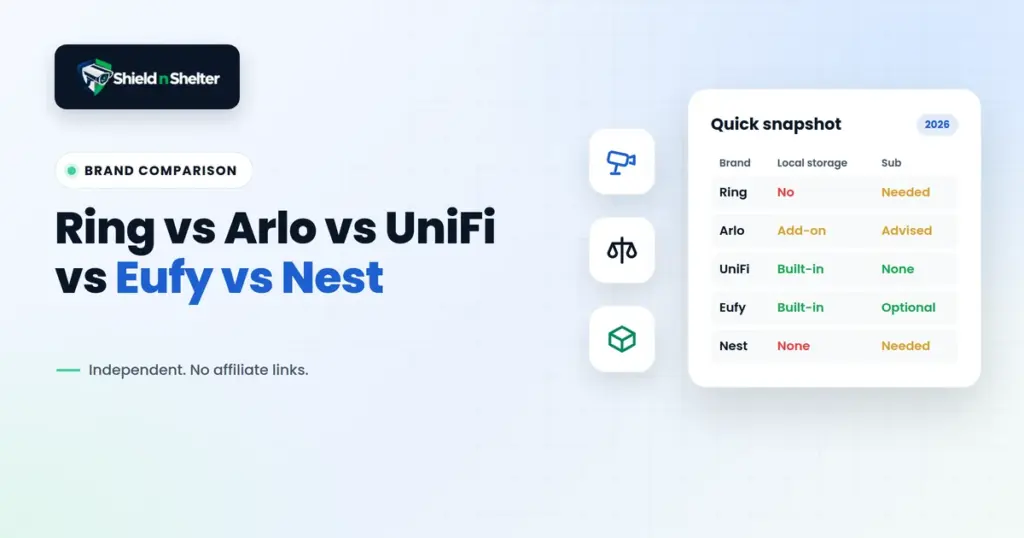
| Brand | Typical Price Range | Subscription Needed? | Local Storage | Best Fit |
|---|---|---|---|---|
| Ring | $30–$280 | Yes, for recorded footage | No | Budget entry + Alexa households |
| Arlo | $40–$350 | Recommended, some local options | Optional (add-on hub) | Wire-free flexibility, premium video |
| UniFi Protect | $180–$500+ | No | Yes, built-in | Pro-grade, scalable, technical households |
| Eufy | $40–$300+ | Optional | Yes, built-in | Budget + no-subscription priority |
| Nest | $100–$330 | Effectively required | None available | Google Home households |
All you need to do is just pick one, and start your journey from here.
Frequently Asked Questions
Is there actually a single best home security camera brand?
No. We focus on budget, wire-free flexibility, subscription tolerance, and existing smart home ecosystem all point to different answers.
Which brand avoids monthly fees entirely?
UniFi Protect has zero subscription fees, with recording lives on a local NVR you own. Eufy comes close!
Which brand is easiest to set up with no technical background?
UniFi is the most capable system here but expects more networking comfort. Do not for Ring, Arlo, and Nest at all.
Do you get paid or receive commission for recommending any of these brands?
No. We have no affiliate relationships, sponsorships, or commission arrangements with Ring, Arlo, UniFi, Eufy, or Nest.
Whichever ecosystem fits your situation, how well any of these cameras serve you depends more on placement and networking than the logo on the box (we do have an article on that). If you’d rather have an independent second opinion on which brand gets your property vision before buying anything, that’s exactly what a Virtual Home Security Audit is built for.