
There is a point where a security camera stops being reassuring and starts becoming annoying. Your Ring goes off. You check it. A car. A few minutes later, another alert. Someone walking past the house.
Then, a shadow moves across the driveway. Your dog wanders through the yard. A spider decides the camera is a good place to build a web.
Eventually, you stop checking. That’s the part worth taking seriously. Too many Ring motion alerts aren’t just irritating. They create alert fatigue.
When every notification looks like another false alarm, you’re more likely to ignore the one that actually matters. The answer isn’t to turn motion detection off. It’s to make the camera better at deciding what deserves your attention.
Why Is My Ring Camera Sending So Many Motion Alerts?
Before changing settings, figure out what’s actually triggering the camera.
Start with the obvious one; traffic. If your camera can see a street, sidewalk, driveway, or another area with regular movement, you’re asking it to monitor far more activity than you probably intended. Passing cars and pedestrians can easily become a steady stream of notifications.
Sunlight can cause problems too. Shadows moving across the ground, reflections from windows or cars, and surfaces that heat up in direct sunlight can all contribute to unwanted activity.
Then there are animals. A pet crossing the yard is harmless, but the camera doesn’t know that unless its detection system and settings are configured to distinguish it.
Even something as small as an insect crawling across the lens can cause trouble. A spider web moving close to the camera can produce repeated alerts, particularly when there’s wind or changing light.
Spend a few minutes watching the camera’s Live View around the times the alerts usually happen. Look at what is actually moving inside the detection area. That often tells you more than changing settings at random.
How to Reduce Ring Motion Alerts Without Turning Motion Detection Off
Once you’ve identified the source, start with the software. Motion Zones are one of the most useful tools for this. Instead of allowing the camera to treat its entire field of view as equally important, narrow the detection area to places where something actually matters.
For example, if the camera covers both your front gate and a busy road, there’s little reason for the road to dominate your alerts. Keep the gate and approach to the property inside the zone and exclude as much of the road as possible.
The same idea works for sidewalks, neighboring properties, tree branches, and other areas that generate constant movement.
Next, look at Motion Sensitivity. If the camera is reacting to every small movement, lowering sensitivity can help. But don’t immediately drag it all the way down. A setting that’s too low can cause the camera to miss activity you actually want to know about.
If your Ring device supports Smart Alerts, use them to make notifications more useful. Depending on the device and subscription, these features can help distinguish between different types of detected activity, such as people, vehicles, or packages.
And don’t confuse snoozing with fixing the problem. Snooze is useful when you temporarily don’t want notifications. Turning motion detection off altogether is something else. If the camera isn’t detecting motion, it can’t record or alert you to movement during that period.
If you’re getting dozens of alerts every day, the better question isn’t “How do I stop the alerts?” It’s “Why is the camera seeing so much?”
Ring Camera Placement: The Geometry Behind False Alerts
Sometimes the settings aren’t the real problem. The camera is.
This is where Pin 05 of the Shield N Shelter placement framework becomes particularly useful: look at the physical geometry of the detection area before trying to solve everything with software. A camera mounted too low can see a lot of activity close to the ground. A camera pointed too far outward can spend much of its view watching the street rather than your property.
Height matters. So does tilt. A slight downward angle can help keep the detection area focused on the ground and entry points you’re actually trying to monitor. If the camera is facing a busy road, changing its angle so the road occupies less of the frame can make a surprisingly large difference.
There’s another useful principle here: movement across the camera’s field of view is generally easier for motion detection to pick up than movement directly toward or away from it.
That means placement isn’t simply about getting the widest possible view. You want the right view. A camera that sees everything isn’t necessarily a camera that’s monitoring effectively.
Ring Motion Alerts Before and After: A 48-to-2 Example
Consider a simple example based on the kind of improvement illustrated in the Austin case study. Before making changes, a Ring camera was producing roughly 48 motion alerts a day.
Most weren’t useful. Cars, pedestrians, shadows, and other activity were occupying the camera’s detection area. Instead of disabling motion detection, the setup was treated as a detection problem.
The motion zone was tightened. Sensitivity was adjusted rather than simply minimized. The camera’s physical position and angle were reconsidered so that less of the road and other high-traffic areas fell inside the detection area.
After those changes, the alert count dropped to around 2 per day. The exact numbers will vary from property to property, but the important point is the approach: reduce the amount of irrelevant movement reaching the detection system instead of eliminating detection altogether.
Why Turning Off Ring Motion Detection Is the Wrong Fix
Turning motion detection off feels satisfying because it immediately stops the notifications. It also defeats one of the main reasons you installed a security camera. Think about it as a signal-to-noise problem. Your camera is supposed to identify useful events from a background full of ordinary movement. If the background becomes too noisy, you don’t solve that by throwing away the signal. You reduce the noise.
That’s what Motion Zones, sensitivity adjustments, Smart Alerts, and better placement are doing. There are situations where temporarily disabling notifications makes sense. Maybe you’re working in the yard, expecting constant movement, or don’t want alerts during a particular period. But permanent motion disablement shouldn’t be the default solution to a poorly configured detection area.
The Shield N Shelter Approach
At Shield N Shelter, we look at this from an engineering perspective. A security camera isn’t useful simply because it’s switched on. Its effectiveness depends on what it’s looking at, how it’s positioned, and how its detection system is configured. So, when a Ring camera starts going off all day, don’t start by turning everything down.
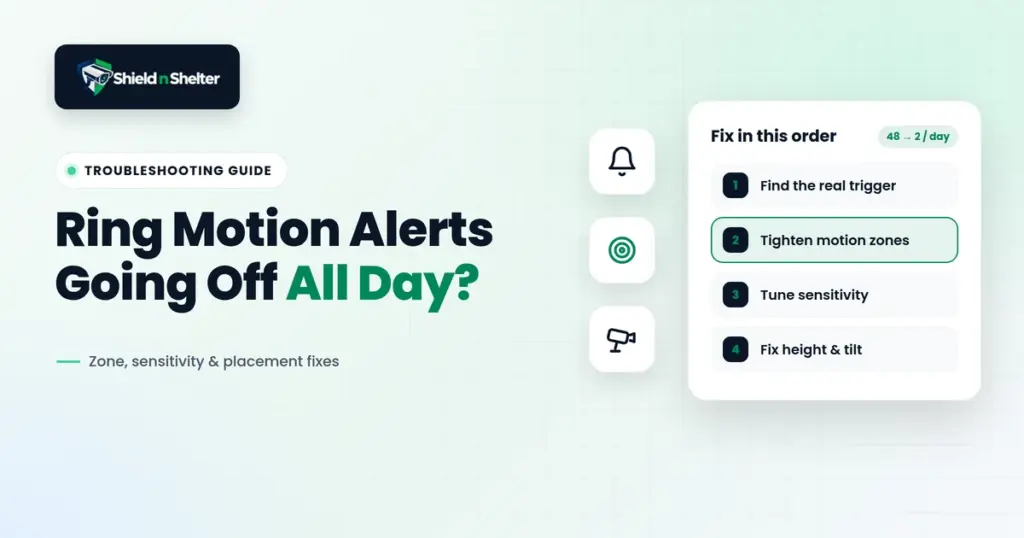
First, find the trigger. Is it the street? A hot surface? Moving shadows? A pet? Vegetation? Something sitting directly in front of the lens?
Then adjust the detection area. Then look at sensitivity and Smart Alerts. And if the camera is physically pointed at the wrong things, fix the geometry. That sequence usually makes more sense than endlessly tweaking settings and hoping the alerts stop.
Don’t disable motion. Engineer it.
Before changing hardware, change the detection area. Before dramatically lowering sensitivity, identify the trigger. And before fighting false alerts with software, ask whether the camera is physically pointed at the wrong things.
That’s usually where the real fix begins.