
You get the alert, open the clip, and the person is already halfway across the porch. Or the video starts after the delivery driver has set the box down and turned around.
If you’ve ever wondered whether your wire-free camera is just bad, the answer is usually no. It’s doing what battery cameras are built to do, and that design has a cost.
Once you see the chain of events behind a single clip, the missing seconds make sense, and so do the fixes.
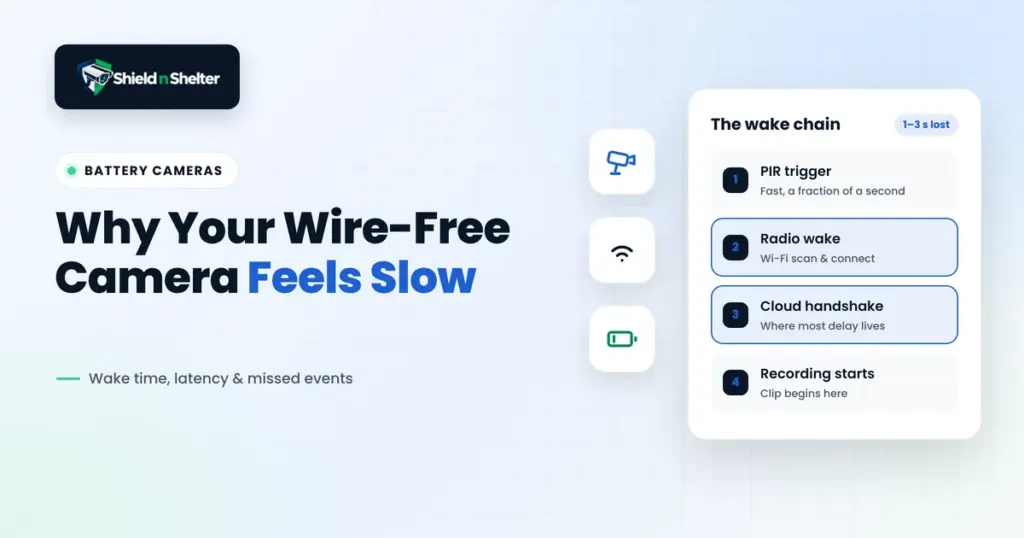
The Cause Chain: What Happens Between Motion and Recording
A battery camera spends nearly its whole life asleep. The goal is months of runtime, so almost everything is powered down except one tiny sensor. An event then has to wake a stack of hardware in sequence, and each step takes time.
- PIR trigger: a passive infrared sensor detects a change in heat across its zones. It’s the only thing awake, and it sips power. It also needs a moving heat source crossing between zones, so a person walking straight at the camera can trigger later than one walking across the view.
- Radio wake: the PIR signals the main processor and radio to power up. Wi-Fi then has to scan, authenticate, and get an IP address, which on a weak signal can take a couple of seconds on its own.
- Cloud handshake: the camera opens a secure connection to the vendor’s servers, authenticates, and negotiates a session before it can send video. Cameras that talk to a local base station skip part of this, which is one reason base station models often wake faster.
- Recording: only now does the image sensor start capturing and sending video. Everything before this point is video that never existed.
Add those up and the first one to several seconds of an event can be missing. That’s the whole missed-event problem in one list. The camera didn’t ignore the event, it was still getting out of bed.
Where the Time Actually Goes
The timings vary by model, but the shape is consistent. The PIR stage is fast, usually a fraction of a second. The radio wake and the cloud handshake are where most of the delay lives, and they’re also the two stages you can influence.
That’s useful, because it means the fixes aren’t mystery tweaks. They’re ways of shortening or skipping specific steps.
Upload Bandwidth: The Quiet Bottleneck
Most people check their download speed and stop. For cameras, upload is what matters, because video flows from your house to the cloud.
A 1080p stream often needs a few megabits per second of upload, and higher resolutions need more. If several cameras trigger at once, or someone is on a video call, an upload connection that looks fine on paper can choke. The camera then buffers, drops quality, or starts recording late.
Run a speed test and look at the upload number specifically. Many home plans offer far less upload than download, so a connection that feels fast for streaming can still be tight for four cameras.
Wi-Fi Signal at the Mount Point
This is the most common hidden culprit. The camera’s signal strength at the spot where it’s mounted decides how fast it wakes and how reliably it connects.
A weak link doesn’t just slow the video, it slows the radio wake itself. Every failed handshake attempt adds time before recording can start. As a rough rule, a signal weaker than about -70 dBm starts causing retries, and weaker still makes wake times unpredictable.
Test it where the camera actually lives, not where the router is. A phone held at the mount point is a decent proxy, since the camera’s antenna is usually smaller and less sensitive than yours. Outdoor mounts are especially prone to this, because walls and siding soak up signal that indoor devices never have to fight.
Base Station Placement
If your system uses a base station or hub, its location matters more than almost anything else. Many of these systems use a dedicated low-power link between the camera and the base, then the base handles the cloud connection. That can shorten the wake sequence, and it keeps working when your home Wi-Fi is congested.
The base needs good range to the cameras and good internet access. Put it in a central spot, off the floor, away from metal and thick masonry, ideally closer to the cameras than to the router. Tucking it in a cabinet behind the modem is convenient and often wrong.
Pre-Roll Buffering
Some cameras offer pre-roll, meaning they save a few seconds of video from before the trigger. It sounds like a fix for the missing seconds, and it can be, but it comes with a catch.
To record before the event, the camera has to keep the image sensor and part of the processor running in a low-power state, constantly buffering. That uses real energy. Cameras with pre-roll tend to drain faster, and some only offer it in certain power modes or on powered setups.
So pre-roll isn’t magic. It trades battery life for a more complete clip, which is a perfectly good trade if you know you’re making it.
Power Mode Settings
Most battery cameras offer power profiles with names like battery saver, optimized, or best video quality. They change how aggressively the camera sleeps, how long it waits between events, and how much video quality it sends.
The saver modes lengthen the cooldown between recordings and may lower resolution, which means a second event shortly after the first can be missed entirely. The performance modes wake more eagerly and record more, at the cost of battery.
Check what your current mode does. The default is often tuned for battery life, not for catching everything.
Fixes in Order of Impact
If you’re going to work on this, here’s the order that tends to pay off the most:
- Fix the signal at the mount point: move the camera, add a mesh node or access point near it, or switch bands if the camera supports it (see our smart home network setup guide). This shortens the radio stage and removes retries.
- Reposition the base station: closer to the cameras, more central, and away from obstructions. If your camera supports a direct link to a base, make sure it’s using it.
- Check upload bandwidth: confirm you have headroom for every camera triggering at once, and reduce stream quality if you don’t.
- Adjust the power mode: move up a tier if you’re missing events, and accept shorter battery life as the price.
- Enable pre-roll if it’s available: worth it for high priority spots like the front door, where an extra few seconds matters most.
- Tune the PIR angle and zones: aim the camera so people cross the sensor’s field instead of walking straight at it, which makes the trigger fire earlier.
None of these cost money, and a couple take five minutes. Together they can claw back a surprising amount of lost time.
The Honest Part: Some Latency Is Architectural
Here’s the part that doesn’t get said enough. Even with perfect Wi-Fi, a well placed base station, and every setting tuned, a battery camera that sleeps between events will always have some delay. The wake sequence is the design. You can shorten it, but you can’t remove it.
The only way to eliminate it is to stop the camera from sleeping. A camera on constant power, whether through a plug-in adapter or Power over Ethernet, can keep its sensor, radio, and cloud connection live around the clock.
Recording can begin the moment motion is detected, and continuous recording is possible too. PoE adds a stable wired connection, which also takes Wi-Fi out of the equation.
That doesn’t make battery cameras bad. It means they’re a trade of convenience and flexible placement for a built-in delay.
What This Means When You’re Choosing a Camera
This is where the cause chain turns into buying advice. The question isn’t battery versus wired in the abstract, it’s which spots can tolerate a delay (compare brands in Ring vs Arlo vs UniFi vs Eufy vs Nest).
- Low stakes spots: a side yard, a back fence, or a shed door often work fine with battery cameras, since a missed first second rarely matters.
- High stakes spots: the front door, the driveway, and the garage are where the first two seconds count most. These are the places to consider powered or PoE cameras if running power is possible.
- Mixed setups: many homes do both, using wired cameras where timing matters and battery cameras where placement or renting makes wiring impractical.
Whatever you pick, plan the signal and the base station before mounting anything, using our home security camera placement guide. The best camera in a weak signal spot will still feel slow, and a modest one with a strong connection often feels better than it has any right to.