
In our years of experience, we’ll let you in on a secret: most motion sensor lights are set and forgotten.
Most of the time, someone mounts it and doesn’t adjust it on day 1. For up to five years, the three small adjustment dials located behind the PIR head, which control its operational behavior, usually remain untouched in their original factory positions.
Sadly, these three dials are the only thing that differentiates a motion light from one that turns on every time a cat walks by, or when the neighbours start debating at 2 a.m., or worse – doesn’t turn on when it counts.
Understanding what each dial in a motion sensor does makes motion sensor programming easy.
Still finding it too difficult? We’re here to make that easier for you.
Know About The Three Dials: SENS, TIME, and LUX
When you are done flipping the PIR motion head over, you will see three small dials which are typically labeled as SENS, TIME, and either LUX or, sometimes, a sun/moon symbol for LUX. Almost all the consumer-based motion lights produced within the past two decades rely on this exact same trio.
The SENS (Sensitivity) adjusts the amount of infrared change needed to activate the sensor, the range of motion it will detect, and how sensitive it will be to a fine motion. Turn it up, and it will also sense motion further away and respond to less jiggling, which is great – until it starts to trigger whenever a passing car drives two driveways over, or a tree branch blows in the wind (more on how to eliminate false alarms).
If it’s turned down too much, it will miss someone who is directly passing through its line of sight. The ideal setting will actually be in the middle, adjusted to fit you and your room, not left at factory default.
Set the duration of the light after the last motion has been detected; remember: this is not the duration of the time it takes to detect a motion, but rather how long the light will remain on. Shorter settings need less energy and push the light to cycle less often, but can also result in a glitch since there is a time gap between the light turning off and someone standing in the zone turning it on again.
The longer setting will feel generous but cost you more electricity, and the longer the light will be on, the less accurate the sensor will be if something new has occurred.
The ambient light level below which the sensor is not allowed to trigger is set by LUX (or dusk/sun-moon dial). Point it towards the sun symbol and the light will only turn on when it’s actually dark outside — perfect for avoiding daytime triggers altogether.
Now turn it to the moon symbol (or all the way around, on many models), and you disable that daylight lockout, but you don’t want that when you’re testing sensitivity and range in broad daylight.
One of the most frequent troubleshooting issues with a motion light is that it appears to “stop working” soon after installation. In reality, it really did not; it’s just that it was left in test mode. If it is flashing instead, see what a motion sensor light blinking red means.
Know More About DualBrite: Two-Level Dimming, and the LED Catch
Many fixtures have a fourth control in addition to the three basics, what Heath Zenith calls two-level motion lighting: DualBrite.
The light turns on automatically at almost half its previous intensity once the sun sets, which is more of an accent light than a full light. If motion is detected, it will change to full brightness for a programmed length of time (typically 1, 5, or 10 minutes) before dropping back to the dim accent light, rather than switching off.
This is a nice option for an entry or porch that you want to be lit up for the evening but don’t want to be running at 100% brightness throughout.
The downside is compatibility: this is a two-level dimmer; it works by limiting the power to the bulb, just like a standard dimmer switch, and the manufacturer’s instructions make it clear that these types should never be dimmed or timed with an external dimmer or timer, because the fixture dims and times on its own.
The low power accent mode was specifically developed for incandescent and halogen bulbs, which have predictable and smooth voltage reduction as the power decreases.
Standard non-dimmable LED bulbs don’t behave in the same manner and can flicker, hum, not dim, or even refuse to light on the lower accent level, the same issue covered in our motion sensor light bulb guide.
When adding LEDs to a DualBrite fixture, the bulb must be approved as an LED fixture, and preferably by the fixture manufacturer, with the exception of adding LEDs to a fixture that is already in place.
Legrand/Pass & Seymour: Occupancy vs. Vacancy Mode
Programming decisions about indoor wall-switch sensors, the kind that can replace a normal light switch in a hallway, bathroom, or closet, are quite different in how the light turns on.
Occupancy mode (auto-on) turns the load on automatically the instant motion is detected, and off automatically after the set time delay with no motion. Fully hands-free in both directions.
Vacancy mode (manual-on) turns a light on when it is turned on by hand and automatically off after the delay when a vacancy occurs. Most Legrand/Pass & Seymour occupancy-vacancy switches actually ship in the Vacancy mode, not the Occupancy mode, so if one of these switches feels like it is not listening to you when you walk in, it would be best to check.
Both modes have a smart safety routine: If the light goes out after some time because someone has walked away, but is then detected again after, say, 30 seconds, the light will automatically turn on again, without requiring you to turn it back on yourself, which can come in handy if you are standing still long enough to reach the timeout.
The mode that is used depends on the room (see occupancy sensor vs motion sensor). It is very common to have automatic lights when you are using a hallway or garage, where you always want the light on when you walk through.
Vacancy mode makes more sense in areas such as closets, pantries, or home office spaces where, instead of opening the door, you may pass by to walk in and out for a short time and do not need the light, and you do not have to rely upon manual controls that cause lights to go on each time you walk through the doorway but don’t go inside.
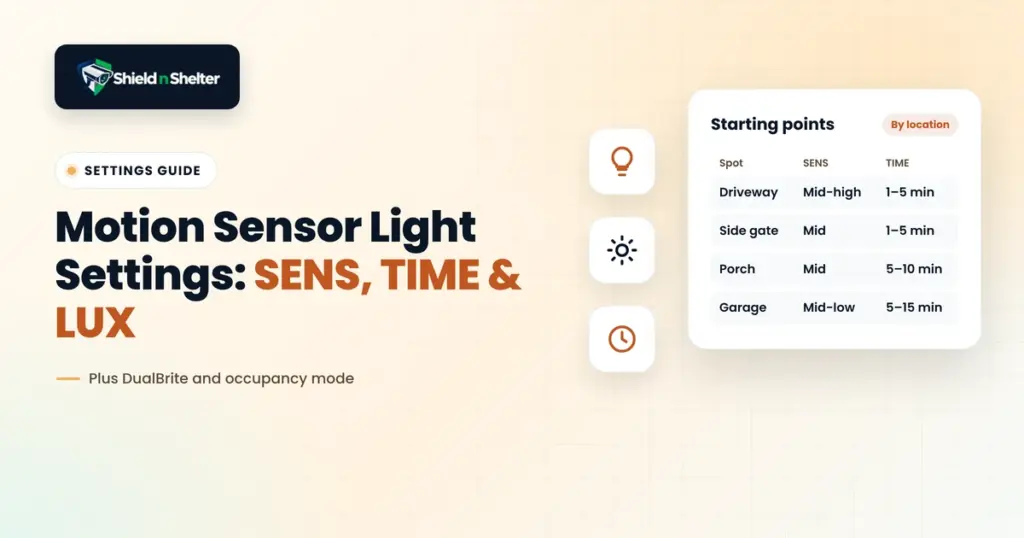
Starting Settings by Location: The Best Way Yet
These are good guidelines, but not absolute. Each brand’s dial range will vary slightly, and you’ll need to adjust after a few days of “real-world” triggering.
- Driveway: SENS mid-high (range), TIME short 1-5 minutes (vehicles and visitors don’t stay long), LUX set to dusk/only (prevents daytime false triggers from passing vehicles).
- Side gate: SENS mid, TIME short (1-5 minutes), LUX dusk-only. A smaller, quieter space wouldn’t require max range, and you would prefer it to keep quiet during the day.
- Porch: SENS mid, TIME medium (5-10 minutes, or DualBrite’s full-bright timer if fitted) to prevent the need to relight every 90 minutes whilst sitting outside, LUX dusk only.
- Garage interior: SENS mid-low (working at close range, not for approach, since this is the interior of a garage), TIME medium-long (5–15 minutes, but you do not want the light to come on mid-task as you would outdoors), LUX irrelevant for most interior fixtures, because they’re not photocell-gated the same way as exterior lights.
Motion sensor programming isn’t a one-and-done setting.
The dial position will vary depending on the exact layout, traffic volume, and the degree of influence you wish the light to have over you so don’t assume the first week following installation is over until you proceed through a few more weeks and determine the actual position.
Till then, best of luck!